PyFlink Series (Part 6)
Back to: Part 5 (Data Stream API Job with Local Kafka Source and JDBC
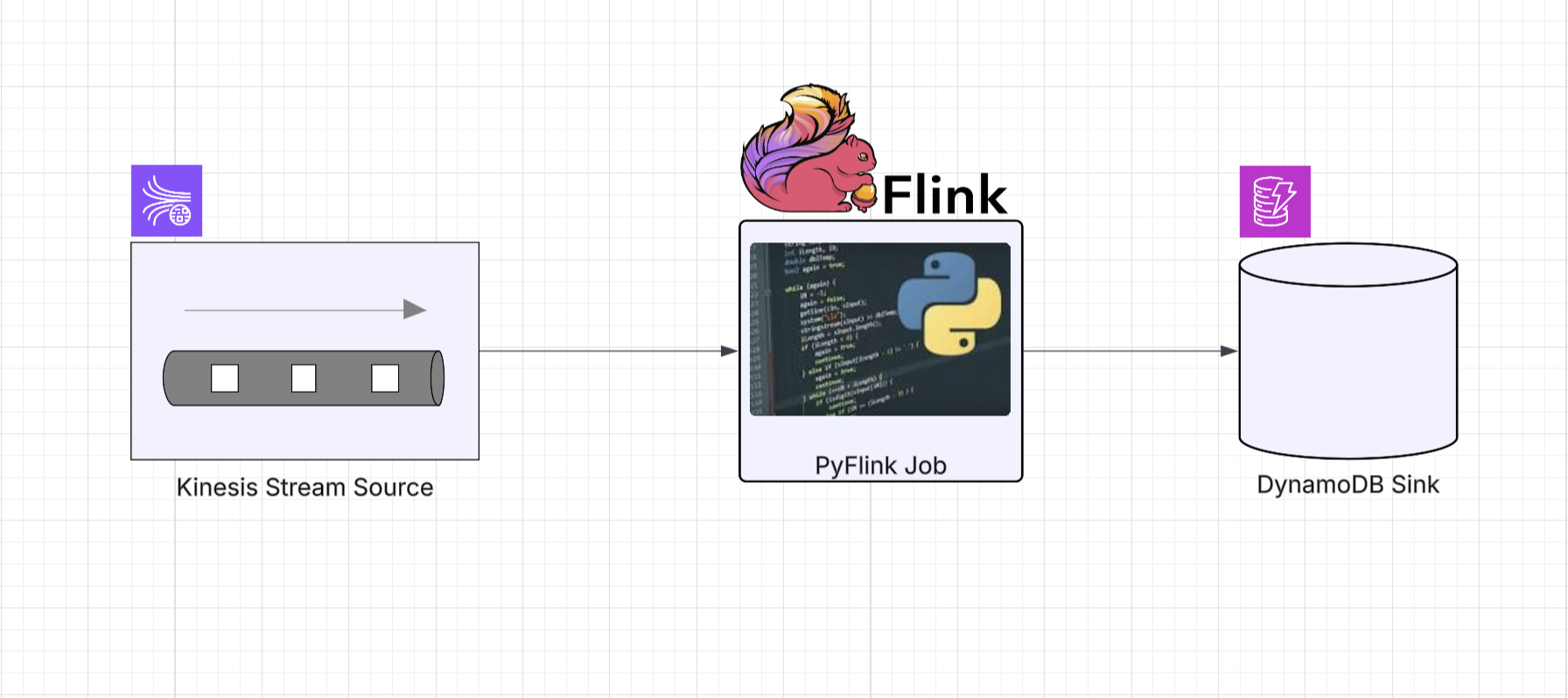
In this final installment we’re going to read sensor events from a Kinesis stream and sink them into a DynamoDB table.
This one is special because at the time of writing, there was no DynamoDB sink available for the PyFlink DataStream API. Just like the JDBC sink in Part 5, we need to reach for an escape hatch, but this time the Java side is more involved, and we’ll create a dedicated Python wrapper class to keep things clean.
As with the previous examples, the example project has everything you need
to run this locally using make targets, LocalStack for Kinesis, and the AWS-provided DynamoDB Local container.
The Job
Define imports
import os
from os import path
from typing import Dict

from pyflink.common.serialization import SimpleStringSchema
from pyflink.datastream import (StreamExecutionEnvironment, RuntimeExecutionMode)
from pyflink.datastream.connectors.kinesis import (FlinkKinesisConsumer)
from pyflink.java_gateway import get_gateway

from framework.connectors.dynamodb import DynamoDbSink
Notice the two new imports compared to earlier jobs. get_gateway gives us access to
PyFlink’s Java interop layer, and DynamoDbSink is our custom Python wrapper around the Java
DynamoDB sink we’ll build below.
Helper functions
The Kinesis source helper should look familiar from Part 4:
KINESIS_ENDPOINT = os.getenv('KINESIS_ENDPOINT', 'http://localstack:4566')
DYNAMODB_ENDPOINT = os.getenv('DYNAMODB_ENDPOINT', 'http://dynamodb-local:8000')


def get_source(stream_name: str, config: Dict = None) -> FlinkKinesisConsumer:
    props = config or {}
    consumer_config = {
        'aws.region': 'us-east-1',
        'aws.credentials.provider': 'BASIC',
        'aws.credentials.provider.basic.accesskeyid': 'test',
        'aws.credentials.provider.basic.secretkey': 'test',
        'flink.stream.initpos': 'LATEST',
        'aws.endpoint': KINESIS_ENDPOINT,
        **props
    }
    return FlinkKinesisConsumer(stream_name, SimpleStringSchema(), consumer_config)
The sink helper is where things get interesting. Instead of a built-in Flink sink, we’re
using our custom DynamoDbSink wrapper:
def get_sink(table_name: str, config: Dict = None) -> DynamoDbSink:
    props = config or {}
    return (DynamoDbSink(**{
        'table.name': table_name,
        'aws.region': 'us-east-1',
        'aws.credentials.provider': 'BASIC',
        'aws.credentials.provider.basic.accesskeyid': 'test',
        'aws.credentials.provider.basic.secretkey': 'test',
        'aws.endpoint': DYNAMODB_ENDPOINT,
        **props
    }))
Build the DAG
Putting it all together, we read from Kinesis, filter out empty records, and sink to DynamoDB:
def run():
    get_gateway()
    env = StreamExecutionEnvironment.get_execution_environment()
    env.set_runtime_mode(RuntimeExecutionMode.STREAMING)
    env.set_parallelism(1)

    if LOCAL_DEBUG:
        jar_location = str(path.join(path.dirname(path.abspath(__file__)), "../lib/bin/pyflink-services-1.0.jar"))
        env.add_jars(f"file:///{jar_location}")
        env.add_classpaths(f"file:///{jar_location}")

    # Build a Datastream from the Kinesis source
    stream = env.add_source(get_source('input_stream'))

    # Filter out empty records
    stream = stream.filter(lambda record: record is not None and len(record.strip()) > 0)

    # Sink to DynamoDB
    sink = get_sink('PyFlinkTestTable')
    stream.sink_to(sink)

    env.execute("kinesis-2-dynamoDB")


if __name__ == '__main__':
    run()
The job itself is concise. The heavy lifting is in the escape hatch code that makes DynamoDbSink possible.
The Escape Hatch: Custom Java Classes via the PyFlink Java Bridge
In Part 5 we introduced the escape hatch pattern: using PyFlink’s Java gateway to call into custom Java code when the Python API doesn’t have what you need. There we kept it simple: a single Java factory class and inline gateway calls in the job itself.
For DynamoDB, we need to go a step further. The DynamoDB connector requires a custom ElementConverter
to transform our JSON strings into DynamoDbWriteRequest objects, and we’ll wrap the whole thing
in a reusable Python class that extends PyFlink’s Sink base.
Step 1: The Java Side
We need two pieces: a sink factory and an element converter.
The DdbSink class is a factory that builds a DynamoDbSink<String> using Flink’s native DynamoDB connector.
It accepts properties for configuration and exposes a nested DdbExecutionProperties class for tuning
the async buffering behavior:
package com.example.pyflink.sink.ddb;

import lombok.*;
import org.apache.flink.connector.dynamodb.sink.DynamoDbSink;

import java.util.Properties;

public class DdbSink {
    public static DynamoDbSink<String> getJsonSink(Properties sinkProperties,
                                                    DdbExecutionProperties executionProperties) {
        return DynamoDbSink.<String>builder()
                .setDynamoDbProperties(sinkProperties)
                .setTableName(sinkProperties.getProperty("table.name"))
                .setElementConverter(JsonDdbElementConverter.builder().build())
                .setFailOnError(executionProperties.isFailOnError())
                .setMaxBatchSize(executionProperties.getMaxBatchSize())
                .setMaxInFlightRequests(executionProperties.getMaxInFlightRequests())
                .setMaxBufferedRequests(executionProperties.getMaxBufferedRequests())
                .setMaxTimeInBufferMS(executionProperties.getMaxTimeInBufferMS())
                .build();
    }

    @Data
    @AllArgsConstructor
    @NoArgsConstructor
    @Builder
    public static class DdbExecutionProperties {
        @Builder.Default
        private boolean failOnError = false;
        @Builder.Default
        private int maxBatchSize = 25;
        @Builder.Default
        private int maxInFlightRequests = 50;
        @Builder.Default
        private int maxBufferedRequests = 10_000;
        @Builder.Default
        private long maxTimeInBufferMS = 500;
    }
}
The JsonDdbElementConverter handles the actual transformation from a JSON string into a DynamoDbWriteRequest.
It recursively walks the JSON structure and maps each node type to the corresponding DynamoDB AttributeValue:
package com.example.pyflink.sink.ddb;

import com.fasterxml.jackson.databind.JsonNode;
import com.fasterxml.jackson.databind.ObjectMapper;
import com.fasterxml.jackson.databind.node.ObjectNode;
import lombok.SneakyThrows;
import lombok.experimental.SuperBuilder;
import org.apache.flink.connector.base.sink.writer.ElementConverter;
import org.apache.flink.connector.dynamodb.sink.DynamoDbWriteRequest;
import org.apache.flink.connector.dynamodb.sink.DynamoDbWriteRequestType;
import software.amazon.awssdk.core.SdkBytes;
import software.amazon.awssdk.services.dynamodb.model.AttributeValue;

import java.util.*;

@SuperBuilder
public class JsonDdbElementConverter implements ElementConverter<String, DynamoDbWriteRequest> {

    final ObjectMapper objectMapper = new ObjectMapper();

    @SneakyThrows
    @Override
    public DynamoDbWriteRequest apply(String jsonBlob,
                                       org.apache.flink.api.connector.sink2.SinkWriter.Context context) {
        ObjectNode jsonNodes = objectMapper.readValue(jsonBlob, ObjectNode.class);
        final Map<String, AttributeValue> item = convertMap(jsonNodes, 0);
        return DynamoDbWriteRequest.builder()
                .setType(DynamoDbWriteRequestType.PUT)
                .setItem(item)
                .build();
    }

    // ... recursive helpers for convertMap, convertList, convertNode
    // that handle all JSON node types -> DynamoDB AttributeValue mappings
}
This converter is generic enough to handle any JSON payload. It maps strings, numbers, booleans, nulls, arrays, objects, and binary values to their DynamoDB equivalents. This means any JSON you push through Kinesis will land in DynamoDB with the correct attribute types.
Step 2: Package It
These classes live in lib/src/main/java/ and get compiled and bundled into the shadowjar
alongside all other connector dependencies when you run:
make jarStep 3: The Python Wrapper
Now the fun part. Our Python DynamoDbSink class extends PyFlink’s Sink base class and uses the
Java gateway to instantiate the Java objects:
from pyflink.datastream.connectors import Sink
from pyflink.java_gateway import get_gateway


class DynamoDbSink(Sink):
    """
    A Dynamo DB (DDB) Sink that performs async requests against a destination table
    using the buffering protocol.
    """

    class Java:
        implements = ['java.io.Serializable']

    def __init__(self, **kwargs):
        java_src_class = get_gateway().jvm.com.example.pyflink.sink.ddb.DdbSink
        exe_props = java_src_class.DdbExecutionProperties.builder().build()
        Properties = get_gateway().jvm.java.util.Properties
        props = Properties()
        for k, v in kwargs.items():
            props.setProperty(k, str(v))
        java_src_obj = java_src_class.getJsonSink(props, exe_props)
        super(DynamoDbSink, self).__init__(java_src_obj)
A few things to call out here:
get_gateway().jvmgives you a reference to the JVM that Flink is running on. From there you can reach any class on the classpath using its fully qualified name- We create a
java.util.Propertiesobject and populate it from Python kwargs. This is how the config flows from Python into the Java sink builder - The
DdbExecutionPropertiesbuilder defaults are used here, but you could easily expose those as additional Python kwargs if you needed to tune buffering - By extending
Sinkand passing the Java object tosuper().__init__(), PyFlink handles all the serialization and lifecycle management for us
This pattern works for any Java class you need to bring into PyFlink. If Flink has a Java connector but no Python bindings, you can follow this same approach: write a thin Java factory if needed, package it into the shadowjar, and write a Python wrapper that uses the gateway.
Running Locally
Start the local services (Flink cluster, LocalStack for Kinesis, DynamoDB Local):
make servicesThe docker-compose setup brings up LocalStack (which provides Kinesis on port 4566) and the
AWS-provided DynamoDB Local container on port 8000.
Create the DynamoDB table:
make create_table_ddbThis creates a PyFlinkTestTable with a composite key of id (HASH) and timestamp (RANGE):
.PHONY: create_table_ddb
create_table_ddb:
	aws dynamodb create-table \
		--endpoint-url http://localhost:8000 \
		--table-name PyFlinkTestTable \
		--attribute-definitions AttributeName=id,AttributeType=S AttributeName=timestamp,AttributeType=S \
		--key-schema AttributeName=id,KeyType=HASH AttributeName=timestamp,KeyType=RANGE \
		--provisioned-throughput ReadCapacityUnits=1,WriteCapacityUnits=1
Submit the job to the local Flink cluster:
make run app=jobs/ds_app_kinesis_ddbGenerating Test Data
The project includes a Kinesis producer that reads sensor records from a JSON file and pushes them
into the input_stream with randomized values and fresh timestamps:
make generate loops=3 delay_ms=200Under the hood, this runs a Python script that uses boto3 to call PutRecord against LocalStack:
def produce(records: list, stream_name: str, endpoint_url: str, delay_ms: int, loops: int):
    client = boto3.client("kinesis", endpoint_url=endpoint_url, ...)

    for i in range(loops):
        for record in records:
            payload = {
                **record,
                "timestamp": str(int(time.time() * 1000)),
                "value": randomize_value(record["value"]),
            }
            data = json.dumps(payload)
            client.put_record(
                StreamName=stream_name,
                Data=data.encode("utf-8"),
                PartitionKey=str(record["id"]),
            )
Each record gets a fresh millisecond timestamp and a slightly randomized value (within 10% drift), so you get realistic-looking sensor data flowing through the pipeline.
Verifying the Results
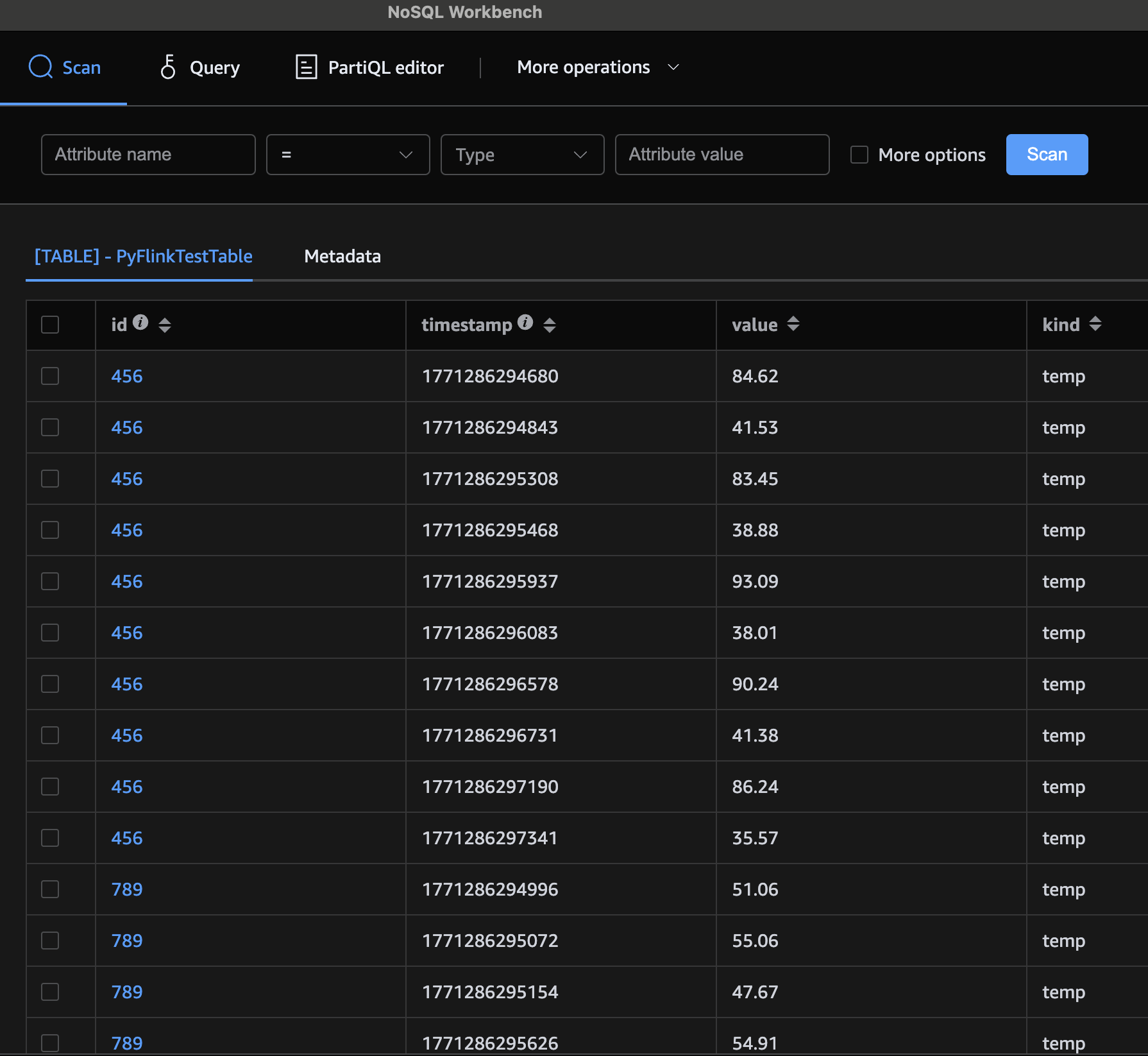
Once the generator has run and the job has processed the events, you can scan the DynamoDB table to confirm the data landed:
make scan_table_ddbYou should see your sensor readings stored with all their attributes mapped to the correct DynamoDB types.
You can also use a local DDB front end, such as AWS NoSql Workbench:
Congratulations! You’ve built a PyFlink DataStream job that reads from Kinesis, sinks to DynamoDB, and bridges the gap between Python and Java when the built-in API doesn’t have what you need. The escape hatch pattern we used here is broadly applicable: any time you find a missing connector or need to leverage Java-only Flink functionality, you can write a thin Java wrapper, package it into your shadowjar, and expose it to Python through the gateway.
Up next: Part 7 (Table & SQL API with Kafka and Postgres)