
sparkctl: Config Driven Model Serving for DGX Spark
A little background
For several internal projects, we leverage open weight models and fine tune them for the task(s) at hand.
A lot of that post training happens in the cloud, but for POC and experimentation, we run locally when we can. On the evaluation side of things, this has proven to be a massive cost optimization, and we’re seeing ROI on hardware already. Being who we are, the drudgery of model provisioning needed to be automated, we’re lazy in the best way :) .
How it started
We provisioned two DGX Sparks connected over the 200G fabric, and for the first few weeks I was
their full time sysadmin. Every model I wanted to test meant the same rituals: ssh into a node,
kick off a HuggingFace download, sometimes watch it stall at 80% because the downloader hung,
restart it, copy the weights to the second node, then hand assemble a docker run command with a dozen vllm
flags I had to look up again every time. Multiply that by testing, benchmarking, and agentic
serving workloads, and I was spending more time shuffling files than actually using the models.

Not happy with the random scripts that started to accumulate, and the brittleness of the whole thing, I did what any reasonable person does and over-corrected into building a proper tool.
The result is sparkctl, a small Python CLI and
orchestration layer for one or more DGX Sparks. The idea is simple: configuration is the source of
truth. Topology lives in cluster.yaml, model configurations live in recipes/*.yaml, and the
CLI makes reality match the config. If a command feels familiar, that’s on purpose, the grammar is
lifted straight from kubectl.
The shape of the thing
Everything is driven by two kinds of files. cluster.yaml describes your hardware and how the
control plane should run:
cluster:
  name: my-spark
  head: spark
  container_image: csv-vllm:26.06-ray
  model_cache: /home/you/models
  api_port: 8000

deploy:
  user: you
  remote_path: /opt/sparkctl

backend: docker            # where model services run

server:
  mode: local              # gateway + metrics + dashboard, no docker needed
  host: local
  port: 8080

nodes:
  spark:
    host: spark-xxxx.local
    lan_ip: 192.168.1.10
And a recipe describes a deployable set of model services:
name: qwen3-coder-30b
services:
  - name: agent
    engine: vllm
    model: ig1/Qwen3-Coder-30B-A3B-Instruct-NVFP4
    served_name: qwen3-coder-30b
    node: spark
    parallel: { tensor: 1 }
    port: 8000
    max_model_len: 65536
    gpu_memory_utilization: 0.85
    tool_call_parser: qwen3_coder
  - name: embeddings
    engine: ollama
    node: spark
    model: nomic-embed-text
    port: 11434
A recipe can mix engines. Here a vllm agent and an Ollama embeddings model deploy together as one unit, which turns out to be exactly what most of my agentic workloads want.
The CLI runs from your laptop and figures out context by hostname.
Read commands run locally and reach out to the nodes over ssh.
Mutating commands push the repo to the nodes first and then run on the head.
Single node: from zero to serving
Setup is a one time thing:
$ cp cluster.yaml.single-node.example cluster.yaml   # describe your Spark
$ ./bin/sparkctl deploy --init                       # provision the node: boot daemon + headless (multi-user) target
$ ./bin/sparkctl build                               # build the vllm+ray image
$ ./bin/sparkctl secret set HF_TOKEN                 # only if you pull gated models; prompts without echo
From there, everything is apply:
$ sparkctl apply qwen3-coder-30b
[ensure] ig1/Qwen3-Coder-30B-A3B-Instruct-NVFP4: present on all nodes
all services stopped
current -> qwen3-coder-30b
== bringing up recipe: qwen3-coder-30b ==
[vllm] single-node serve 'agent' on spark (image csv-vllm:26.06-ray)
[manifest] active.json written on all nodes (recipe qwen3-coder-30b @ 856f10c8c7b7)
apply does the whole dance: makes sure the weights exist (downloading and verifying if they
don’t, more on that below), tears down whatever was running, repoints the current marker, and
brings the new recipe up. Switching models for a benchmark run is one command, and switching back
is one command. The boot daemon serves whatever recipe is current, so a power blip doesn’t cost
you a morning.
The kubectl muscle memory works for inspection too:
$ sparkctl get recipes
CURRENT  NAME
         minimax-m3-reap50
*        qwen3-coder-30b
         qwen3-235b

$ sparkctl get services
NAME        SERVED            ENGINE  MODEL                                   SIZE   PRECISION  NODE   PORT   STATUS
agent       qwen3-coder-30b   vllm    ig1/Qwen3-Coder-30B-A3B-Instruct-NVFP4  18GB   NVFP4      spark  8000   Up 3 minutes
embeddings  nomic-embed-text  ollama  nomic-embed-text                        0.3GB  F16        spark  11434  Up 3 minutes

$ sparkctl logs agent -f
One detail I care about a lot: every deploy writes a manifest with the recipe’s sha256 to each
node, and sparkctl status compares what is actually running against what the config says should
be running. It tells you “matches current” or “DRIFT”, not just “a container exists”. When you
edit recipes as often as I do, that distinction saves real debugging time.
You don’t have to write the yaml by hand
Recipes are just files, and after you’ve written a couple the shape is obvious. But the first one for a new model always meant the old ritual in a new outfit: looking up which tool-call parser it wants, which reasoning parser, and the handful of flags that suit it. So there’s a wizard:
$ sparkctl create recipe
sparkctl recipe wizard - press Enter to accept [defaults].

Recipe name (-> recipes/<name>.yaml): gpt-oss-20b
Engine (vllm|ollama) [vllm]:
Model (HF repo, e.g. openai/gpt-oss-20b): openai/gpt-oss-20b
  detected family: gpt-oss - harmony format is built in - no tool/reasoning parser needed
Served name (API model id) [gpt-oss-20b]:
Tensor-parallel size (1=single node, 2=both nodes) [1]:
Node to pin (single-node) [coach]:
...
[create] wrote /home/you/sparkctl/recipes/gpt-oss-20b.yaml

next steps:
  sparkctl pull gpt-oss-20b            # download weights (verified)
  sparkctl apply gpt-oss-20b --wait    # serve it + set current
The wizard recognizes the model family and fills in the parts that used to send me back to the docs, the right parsers, sensible sizing, and defaults tuned for a Spark, so bringing up a model I haven’t tried is a thirty-second conversation instead of a research session. Anything it doesn’t recognize still gets sane defaults and plain prompts. Either way you end up with a committed, versioned recipe instead of a one-off command, which was the whole point.
One endpoint for everything
Serving a model is only half the problem. Your tools want a stable OpenAI compatible endpoint that doesn’t change every time you move a model between nodes. That’s the unified server:
$ sparkctl serve
[server] up on local:8080 (mode: local) - /v1 /metrics /dash /healthz
One process, one port, no docker required. It runs LiteLLM under the hood (no reason to reinvent
model routing), generates the route table from whatever is currently deployed, and restarts itself
whenever you apply a new recipe. Point your agents, IDE, whatever at localhost:8080/v1 and stop
thinking about which node serves which model. If two nodes serve the same served_name, they
automatically become a load balanced pool.
The same process also aggregates metrics. Every vllm instance already exposes Prometheus metrics,
so the server scrapes each node and re-exposes the whole cluster on a single /metrics endpoint,
along with node level basics that work even for engines that expose nothing (unified memory,
GPU utilization, disk). On a Spark, nvidia-smi reports N/A for memory because it’s all unified,
so sparkctl reads the number that’s actually true instead.
Metrics are obviously a critical tool for benchmarking and debugging, so there’s a terminal view when you don’t want to leave the shell:
$ sparkctl top nodes
NODE   RUNNING  WAITING  KV-CACHE  PROMPT-TOK/S  GEN-TOK/S  MEM       GPU
spark  2        0        41.3%     8214          617        98/122Gi  87%
There’s also a zero dependency status page at /dash:
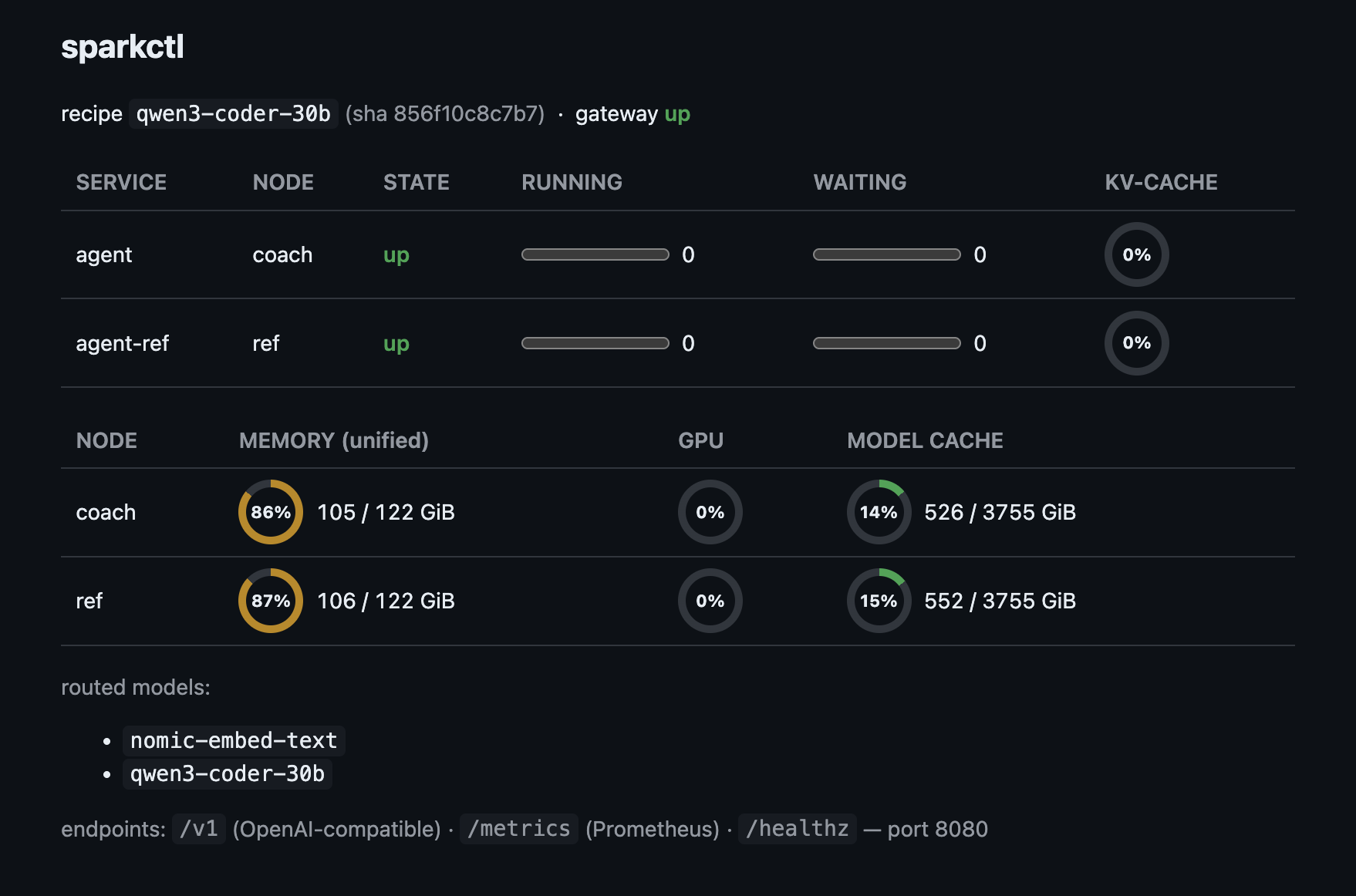
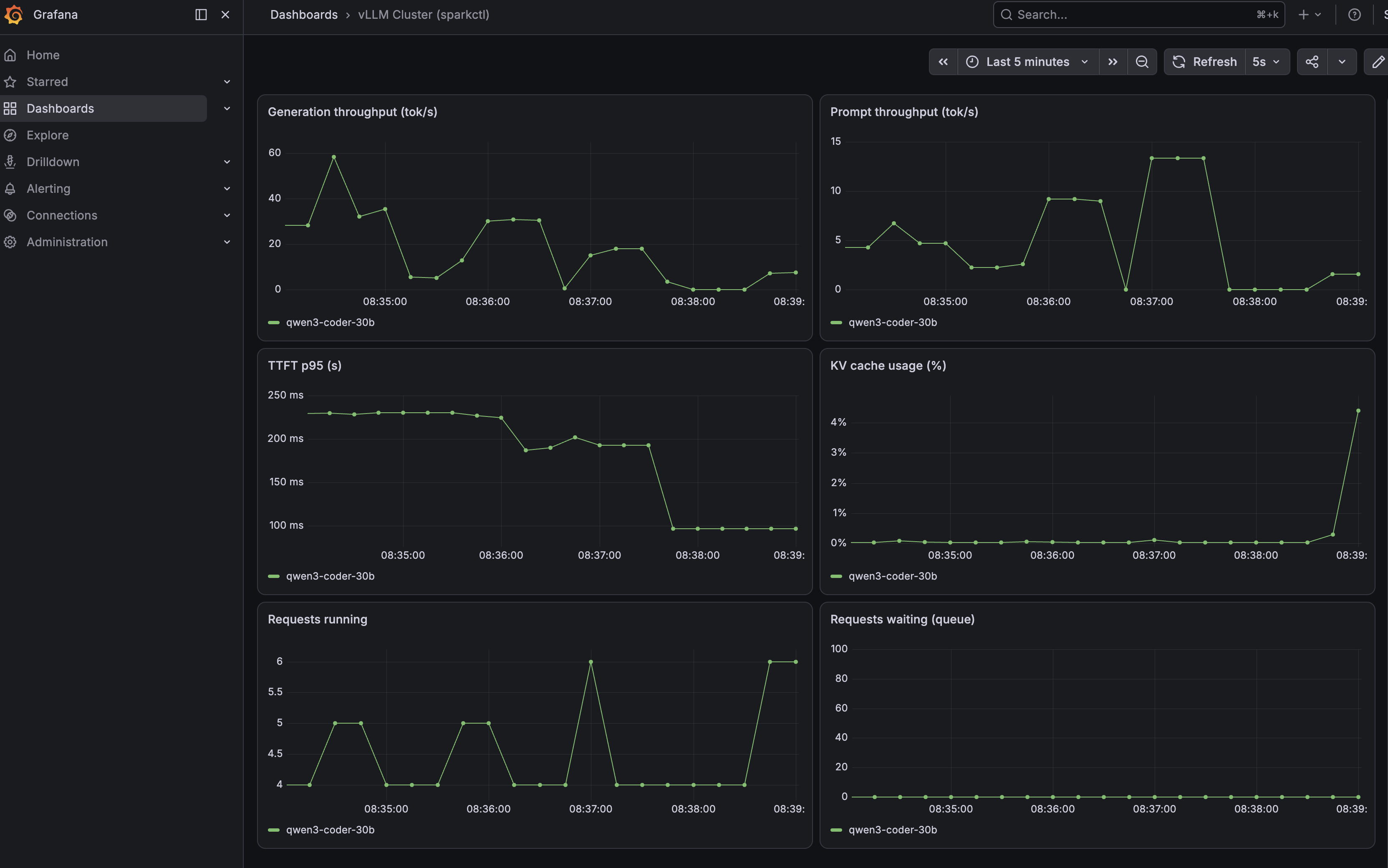
If you want real dashboards, set server.grafana.enabled: true and sparkctl provisions Prometheus
and Grafana containers pointed at that single metrics endpoint, dashboard included.
Splitting a model across nodes
A single Spark tops out around what a 120B class MoE model needs. For the bigger stuff, two Sparks can serve one model with tensor parallelism over the CX7 fabric. My two are named coach and ref, and in sparkctl spanning them is a recipe change, not a project:
name: qwen3-235b
services:
  - name: agent
    engine: vllm
    model: RedHatAI/Qwen3-235B-A22B-NVFP4
    served_name: qwen3-235b
    parallel: { tensor: 2 }     # no node pin: spans the cluster
    max_model_len: 32768
    gpu_memory_utilization: 0.85
tensor: 2 with no node pin tells sparkctl this service spans the cluster. On apply it starts
Ray containers on the head and worker, wires up the NCCL environment for the fabric (dual rail,
the right interfaces, the tuned knobs you only want to figure out once), and launches vllm with
the Ray executor. The API comes up on the head like any other service, and the gateway routes to
it like any other model. Your client code cannot tell the difference.
The other multi node trick goes the opposite direction: run the same 30B model independently on
both nodes with the same served_name, and the gateway load balances two concurrent agents across
them. Big split model or two fast replicas is a one line difference in a recipe, which makes
comparing the two setups for a given workload almost embarrassingly easy.
Weights distribution is where the early pain paid off. pull downloads once on the head with a
stall watchdog (the modern HuggingFace downloader has a known hanging problem, so sparkctl kills
and resumes stalled downloads automatically), then verifies every shard by comparing its sha256
against the blob name, then mirrors to the other node over the fabric and verifies again. A
corrupt shard cannot reach a serve. That property is not negotiable in this tool.
When I want to line up a night of downloads, pull-queue takes a list and runs it detached on the
head, so it survives my laptop going to sleep:
$ sparkctl pull-queue gpt-oss-20b gpt-oss-120b
[pull-queue] launched detached on coach: gpt-oss-20b gpt-oss-120b
The NAS option
If you experiment with a lot of models, even verified downloads get old. My download queue was regularly pulling hundreds of gigabytes I had already downloaded the month before and deleted for space. So distribution is pluggable: point sparkctl at a NAS and it becomes the first stop.
nas:
  mode: path                # an NFS mount visible on the head, or mode: ssh for an rsync endpoint
  path: /mnt/nas/models
With that in place, apply resolves weights in order: already on the nodes, done. On the NAS,
replicate from there over the local network instead of the internet. Nowhere, download once
straight to the NAS, replicate out, and next time it’s a replicate. Every hop still gets the
sha256 verification treatment.
There’s a matching view for it. get models inventories every model installed anywhere (each
node’s HF cache, each node’s ollama store, the NAS) and ties each one to the services using it:
$ sparkctl get models
MODEL                                           NAME              SOURCE  SIZE   PRECISION  SERVICES    COACH  REF  NAS
nvidia/NVIDIA-Nemotron-3-Super-120B-A12B-NVFP4  nemotron-3-super  hf      80GB   NVFP4      agent       ✓      ✓    ✓
nomic-embed-text                                nomic-embed-text  ollama  0.3GB  F16        embeddings  ✗      ✓    -
RedHatAI/Qwen3-235B-A22B-NVFP4                  -                 hf      144GB  NVFP4      -           ✗      ✗    ✓
That last row is the whole feature: nothing references those weights today and they aren’t on either node, but the day a recipe wants them, it costs a local network copy, not a 144GB download.
Beyond docker
Everything above runs on the default backend: containers over ssh, no infrastructure beyond docker and systemd. For a homelab of one or two Sparks I think that’s the right amount of machinery, and it’s the flagship path.
But the execution layer is deliberately a plugin. There’s a backend: key in cluster.yaml, and
the entire rest of the tool (the CLI verbs, the gateway route table, the metrics aggregation)
talks to a small interface rather than to docker directly. The gateway only ever asks a backend
“where do models serve” and the metrics side only asks “what do I scrape”, so a backend that
answers those questions gets the whole control plane for free.
backend: k8s # roadmap: services become Deployments, pull becomes a Job writing to a PVCThe k8s backend is a stub today, it fails loudly and politely if you select it. But the seam is real and tested, and it’s where the project goes next: same recipes, same CLI, pods instead of containers for people who already run a cluster. The unified server has the same axis, it can run as a plain process, in docker, or eventually as a Deployment.
That’s the part of the design I’d defend the hardest. Model serving tools tend to either assume you live in Kubernetes or pretend it doesn’t exist. Making the runtime a config key means the homelab default stays simple and the escape hatch is already there.
Wrapping up
sparkctl exists because I wanted apply to mean the same thing for models that it means for
everything else in my life: describe the end state, let the tool close the gap. If you have a
DGX Spark (or two) and you’re tired of being your own model librarian, give it a look at
github.com/bradodarb/sparkctl. Issues and recipes for
models I haven’t tried are very welcome.